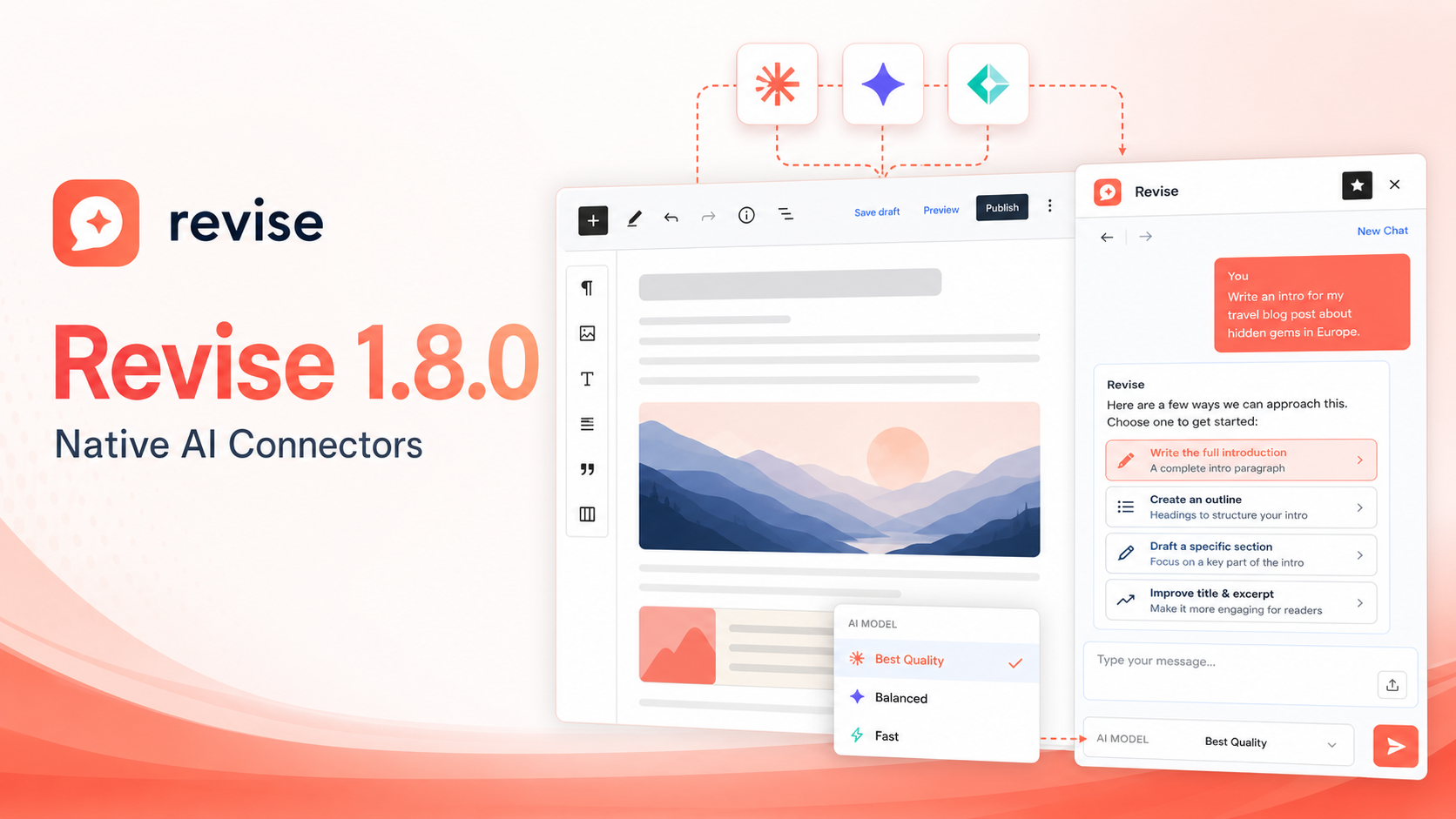
Revise 1.8.0 is here, and this release makes a big architectural shift: Revise now uses WordPress 7’s native AI Connectors instead of managing its own provider settings and API keys.
That means a cleaner plugin, fewer duplicated settings, and better alignment with where WordPress AI tooling is headed.
What’s New
Revise no longer includes its own AI provider configuration screen. Instead, it uses the AI providers you configure through WordPress itself in Settings -> Connectors.
This keeps credential management where it belongs: in WordPress’s native connector system. Revise simply asks WordPress for an available text-generation model and uses it inside the Gutenberg editor.
Choose Your AI Model
Revise 1.8.0 also adds a model selector directly in the chat composer.
If you have multiple configured connector models available, you can choose the one you want to use for a conversation. This makes it easier to switch between faster models, more capable models, or provider-specific options without leaving the editor.
Clickable Assistant Options
AI responses can now include selectable next-step options.
When Revise offers several possible actions, such as writing a full page, creating an outline, drafting a section, or improving metadata, those options can appear as clickable choices. Select one, and Revise drops it into the chat box so you can edit it or send it as-is.
It is a small interaction improvement, but it makes the assistant feel much more fluid when you are shaping content in stages.
Why This Matters
Revise is built to feel native to WordPress, not bolted on. Moving to WordPress AI Connectors helps simplify the plugin and reduce duplicated provider logic.
For site owners, this means:
- No Revise-specific API key storage
- AI provider setup lives in WordPress Connectors
- Cleaner model selection
- A more focused editing experience
- Better compatibility with the WordPress AI ecosystem going forward
Upgrade Notes
Revise 1.8.0 requires WordPress 7.0 or newer.
After updating, make sure you have an AI connector configured in WordPress under Settings -> Connectors. Once a connector is available, Revise will use it automatically inside the block editor.
Available Now
Revise 1.8.0 is available today with native WordPress AI Connector support, model selection, and selectable assistant options.
This release is a quieter kind of upgrade: less configuration, fewer plugin-specific assumptions, and a smoother writing workflow where the AI feels more like part of WordPress itself.Revise 1.8.0 is here, and this release makes a big architectural shift: Revise now uses WordPress 7’s native AI Connectors instead of managing its own provider settings and API keys.
That means a cleaner plugin, fewer duplicated settings, and better alignment with where WordPress AI tooling is headed.
What’s New
Revise no longer includes its own AI provider configuration screen. Instead, it uses the AI providers you configure through WordPress itself in Settings -> Connectors.
This keeps credential management where it belongs: in WordPress’s native connector system. Revise simply asks WordPress for an available text-generation model and uses it inside the Gutenberg editor.
Choose Your AI Model
Revise 1.8.0 also adds a model selector directly in the chat composer.
If you have multiple configured connector models available, you can choose the one you want to use for a conversation. This makes it easier to switch between faster models, more capable models, or provider-specific options without leaving the editor.
Clickable Assistant Options
AI responses can now include selectable next-step options.
When Revise offers several possible actions, such as writing a full page, creating an outline, drafting a section, or improving metadata, those options can appear as clickable choices. Select one, and Revise drops it into the chat box so you can edit it or send it as-is.
It is a small interaction improvement, but it makes the assistant feel much more fluid when you are shaping content in stages.
Why This Matters
Revise is built to feel native to WordPress, not bolted on. Moving to WordPress AI Connectors helps simplify the plugin and reduce duplicated provider logic.
For site owners, this means:
- No Revise-specific API key storage
- AI provider setup lives in WordPress Connectors
- Cleaner model selection
- A more focused editing experience
- Better compatibility with the WordPress AI ecosystem going forward
Upgrade Notes
Revise 1.8.0 requires WordPress 7.0 or newer.
After updating, make sure you have an AI connector configured in WordPress under Settings -> Connectors. Once a connector is available, Revise will use it automatically inside the block editor.
Available Now
Revise 1.8.0 is available today with native WordPress AI Connector support, model selection, and selectable assistant options.
This release is a quieter kind of upgrade: less configuration, fewer plugin-specific assumptions, and a smoother writing workflow where the AI feels more like part of WordPress itself.